Homelab authoritative DNS for nerds
Article info
Posted on by Matthias Valvekens
Background
Every network needs DNS, at its most basic level to look up IP addresses of host names. If you don’t run services of your own, maybe you can get away with configuring a public DNS resolver like Cloudflare’s (1.1.1.1) or Google’s (8.8.8.8). Perhaps you set up a forwarder on your network yourself that does some ad blocking, like a PiHole. If you’re feeling slightly more adventurous and/or privacy-conscious, maybe you operate your own recursive resolver.
Authoritative DNS is a little different: an authoritative DNS server doesn’t look up addresses, it acts as a source of truth for some part of the DNS namespace.
Many home networks have some basic form of authoritative DNS, in the form of a router that also serves up a directory of host names from its list of DHCP leases. That’s not what this post is about. Rather, I intend to walk you through my personal setup that deals with subdomain delegation, DNSSEC, primary/secondary name server topologies, zone transfers, hostname registration using dynamic DNS, and low-touch local ACME DNS-01 challenge handling.
Is it overkill for a homelab? Absolutely. But that’s what you’re here for, right?
The role of authoritative DNS
Primaries and secondaries
I’m going to assume that you already know more or less how DNS name resolution works, but if you don’t, here’s the basic principle. Let’s say we’re trying to get an IPv4 address for foo.example.com. When a DNS resolver receives a request for an A record for foo.example.com, it works its way down from the DNS root zone until it finds an authoritative name server. The exact way in which this works is of course a little more complex–and there’s tons of caching involved–but at its root this is how it works. Name servers for higher-level zones delegate to lower-level name servers, all the way down the chain.
The main vehicle that makes this delegation work is the NS record. An NS record names an authoritative name server for a particular zone. For example, when you register example.com with a registrar, this results in the creation of an NS record for example.com in the com zone, indicating which name server is responsible for example.com. If your registrar, like most registrars, offers DNS management services bundled with domain registration, this record will likely point to a server operated by the registrar by default.
But this doesn’t have to be the case: if you want to host your DNS services with another provider (say Cloudflare or AWS), or if you want to host your own authoritative DNS, you can request to register NS records of your own choosing.
If needed, you can then further sub-delegate by creating NS records in the example.com zone for deeper zones like emea.example.com, apac.example.com, etc.
Authoritative name servers as they’re traditionally deployed fall into two categories:
- A primary name server contains the “master record” for one or more DNS zones.
- A secondary name server still acts as an authoritative name server within DNS, but defers to another authoritative name server to get the correct state for the zones it serves.
This distinction is purely operational; there’s no fundamental distinction between the two in terms of how a primary/secondary server is declared in DNS records. From an outsider’s point of view, there’s not necessarily any observable difference.
Note that a secondary name server is very different from a recursive resolver! A secondary name server still only serves records for the zone(s) for which it is authoritative, it makes no attempt to resolve records from servers other than its primaries.
While it’s theoretically possible to have a single server operate both as a recursive resolver and as an authoritative name server, that’s considered an antipattern.
The “hidden master” pattern
A common way in which authoritative DNS servers are set up (which I happen to like) involves arranging two or more DNS servers in the following configuration:
- A primary name server which is walled off from the wider network it serves (the “hidden master”), and does not appear in any NS records.
- A secondary name server (possibly several) that pulls data from the primary via DNS zone transfers1 (
AXFR), and is deployed in a network zone that is accessible to clients. NS records only refer to these secondaries.
This has several compelling advantages.
Redundancy
Achieving high availability and load distribution is very straightforward: one primary can support many secondary servers; when the primary goes down, the secondaries keep serving the last known state of the zones they manage until the primary comes back.
Client-facing servers are cattle, not pets
The state that lives on the secondaries is ephemeral, so they can easily be treated as disposable. If one misbehaves, you take it down and spin up a new one. Once it grabs the zone data from the primary, it’s ready to go with minimal configuration.
Decoupling of internal DNS topology from public view
The internal DNS topology is hidden from view. If you want to switch from a single-primary model to a multi-primary setup, move zones between different primaries or renumber your internal network, none of that noise leaks into the public DNS.
Reduced attack surface
The secondaries are not exposed to valuable long-lived credentials such as DNSSEC keys. Additionally, advanced features such as dynamic records or live DNS updates only need to be supported on the hidden primary server.
My DNS stack
Parent zone
The mvalvekens.be zone is hosted from Cloudflare, to insulate myself against problems resulting from my home network connection going down. The records I keep in there are generally expected to remain roughly static over time2. I delegate a sub-zone in there to my homelab.
GitOps and orchestration
I run my DNS services (primaries and secondaries3) for the lab zone in Kubernetes. Resolvers too, for that matter, but that’s not the point of this post. All configuration is managed in git. This includes static DNS records for my homelab services4, delegation relationships between zones and TSIG-based access controls.
I insist on interactions between components in the stack being standards-based. Then, if I want to swap out any of them with a different implementation, I can do so with minimal friction.
Primary DNS backend
The lab’s primary DNS runs on PowerDNS, with a PostgreSQL database as the storage backend. All dynamic DNS features are implemented in here, and I use Lua policies to handle fine-grained access control. More on that below. The granular access controls allow me to set up some dynamic DNS features without having to fork over zone-level access, or even worse, plaster Cloudflare API keys all over the place. This is particularly interesting for allowing services to manage their own certs using ACME DNS-01. My router also registers host names in the authoritative DNS using RFC 2136 DNS updates
A nice bonus of hosting the DNS data in PostgreSQL is that my standard database back-up process now automagically covers DNS data as well.
Secondary client-facing DNS backend
My secondaries run good old bind. Boring, but effective.
bind keeps data on the local file system. Ugh, how primitive. But that also means that database outages don’t take down my DNS. And since the state is ephemeral anyway, I don’t need to worry about backing up those zone files either.
Dealing with IPv4
Since I’m on a residential connection, I don’t have the privilege of having a static public IPv4 address. I’m fortunate enough not to be behind cgNAT, but my public IPv4 address changes at least on every router reboot. My IPv6 prefix is stable, but there are quite a few DNS resolvers out there that don’t perform lookups over IPv6, so this presents some challenges. Initially, I had a Cron job set up to watch for changes in my public IPv4 address and update the relevant glue records in Cloudflare. I wasn’t a fan of having to keep a Cloudflare API key around for that purpose, though, so I instead opted to host an extra secondary authoritative DNS server on a VPS that I was already paying for anyway.
Intermezzo: ACME DNS-01 challenges
How the challenge works
ACME, the certificate issuance automation standard popularised by Let’s Encrypt, has been around for a while by now. Nonetheless, it’s interesting that I still seem to run in to folks all the time who are convinced that it’s practically unusable for services that don’t sit behind an internet-facing HTTP reverse proxy. Sure, such a topology is indeed all but required to carry out domain validation using the ACME HTTP-01 challenge, but who said that was the only way?
This myth just won’t die. In particular, whenever the CA/Browser forum decides to tighten the screws on certificate lifetimes in the public web PKI, there’s a small but persistent crowd on /r/sysadmin that goes “…but muh internal services!! Now I have to do even more manual certificate wrangling, clearly those PKI nerds have never managed an enterprise-grade network. Fmgrkdsljf.”.
This argument doesn’t hold water for several reasons. The one I want to focus on here is the fact that this is a non-issue if you have a well-oiled authoritative DNS infrastructure; the ACME DNS-01 challenge is why. Here’s how it works.
Let’s say we have a web service running at foo.example.com. Like the case of the HTTP-01 challenge, the issuance process starts with the server reaching out to an ACME directory, which results in a nonce value S. To prove control of the foo.example.com host name, the server writes S to a TXT record at _acme-challenge.foo.example.com. Once the ACME provider witnesses this value, the domain control is considered validated, and the certificate is issued. There’s a similar process for wildcard certificates.
Note that this process at no point requires the ACME provider to be able to make an HTTP request to foo.example.com or even to resolve an A/AAAA record for foo.example.com at all! The only real requirement here is that _acme-challenge.foo.example.com live in a publicly visible DNS zone5.
Locking down DNS-01
Now, your first instinct might be to say “But wait! Doesn’t this require giving random services credentials with write access to the DNS server?”—and you would be right: online tutorials to set this up will often contain suggestions like “Just run acme.sh with the Cloudflare/Route53/Namecheap/… whatever provisioner, give it an API key, and presto!”. But we’re responsible sysadmins. We don’t want to give production cattle servers access to our DNS crown jewels, do we?
One way to solve this would be to put each host in its own DNS zone and handle access controls at the zone level. This works in theory, but the configuration is finicky and the burden on resolvers is higher, not to mention the price tag with most managed DNS hosting providers.
The standard workaround for this problem involves another layer of indirection. Going back to the foo.example.com example from before, the record we need write access to is _acme-challenge.foo.example.com. Let’s assume that this record lives in the example.com zone, and for the sake of the argument, that the DNS provider does not allow setting access policies at the individual RRset level6. If you want to keep example.com on lockdown but still allow ACME DNS-01, you can delegate ACME DNS-01 to a different zone with looser access controls.
Concretely:
- Create a zone called
acme.example.comor something similar. - Add a
CNAMErecord for_acme-challenge.foo.example.cominexample.compointing tofoo.acme.example.com7. - Issue credentials that can put a TXT record at
foo.acme.example.com. - Turn on DNS alias / challenge alias mode in your ACME implementation.
- Request your certificate.
The nice thing about this approach is that it works just fine across DNS providers! If you want to keep your primary DNS on a cloud provider for resilience, but self-host the DNS zone that you use to serve ACME challenges, nothing stops you from doing that.
Low-touch ACME with PowerDNS
With PowerDNS, you can actually take this one step further: Lua policies allow setting up very granular ACME access controls.
When evaluating a TSIG-authenticated request, the update policy has access to the name of the TSIG key that was used to sign the request.
If your ACME zone is acme.example.com, you can make it so that any TSIG key can write TXT records to <key-name>.acme.example.com.
The script below is similar to this example in the PowerDNS documentation.
function updatepolicy(input)
  -- load settings from a Lua configuration file
  local settings = dofile("/etc/pdns/update-policy-settings.lua")

  local updateZoneStr = input:getZoneName():toString()
  local tsigName = input:getTsigName()
  local tsigNameStr = tsigName:toString()


  -- block unauthenticated requests
  if tsigName:countLabels() == 0 then
    return false
  end

  if input:getQType() == pdns.TXT then
    -- allow multiple ACME zones
    -- (e.g. to keep separate zones for public/private ACME lookups)
    for _, acmeZone in ipairs(settings.acmeZones) do
      if updateZoneStr == acmeZone then
        local target = input:getQName():toString()
        local allowedScope = tsigNameStr .. acmeZone
        -- accommodate ACME implementations that insist on the alias having an
        -- _acme-challenge prefix as well.
        if target == allowedScope or target == "_acme-challenge." .. allowedScope then
            return true
        end
      end
    end
  end

  return false
end
The onboarding process for an ACME-enabled service is now very simple:
- Generate a TSIG key with a unique name.
- Create a CNAME record for
_acme-challenge.<service>to<key-name>.acme.example.com - The access policy does the rest.
DNSSEC
What is DNSSEC?
The DNS protocol historically had no security mechanisms in place: replies can be spoofed, leading to fun attacks like DNS cache poisoning.
DNSSEC solves the DNS authenticity problem by adding signatures to records. Like name server delegations, this also involves delegation: alongside NS records to identify a name server, DNSSEC-enabled delegation also requires a DS key that anchors the trust for the child zone’s signatures in the parent zone. This DS record serves to validate the child zone’s KSK8.
Assuming all parts of the chain are DNSSEC-aware—this is not a given!—this validation chain is supposed to stretch all the way to the root zone, which acts as the trust anchor for the entire DNS.
Key management woes
The fact that signatures are involved means that there’s a key management problem to be solved here. There are, broadly speaking, two ways to go about this:
- Pre-sign: the DNS server doesn’t hold any key material, it just serves records. The signatures themselves are pre-generated using key material that is managed offline.
- Online signing: the DNS server manages its own key material and produces signatures as necessary.
Technically, KSKs can (and do) live on a longer time scale than the ZSKs they certify. Distinguishing between the two types creates a few more permutations, but let’s not delve too deeply into that.
I have the hardware to operate a pre-sign setup, but DNSSEC isn’t “set it and forget it” even if the zone data itself doesn’t change: signatures have a shelf life, so that option requires quite a bit of operational overhead that I wasn’t willing to take on right now—maybe later.
Instead, I went with online signing. The hidden master setup shines here too: since the signing happens on the hidden primary, the DNSSEC keys actually never touch the secondary servers: from their perspective, they’re effectively serving pre-signed zones.
PowerDNS’s DNSSEC capabilities are thoroughly documented.
Segmentation
DNS zones in my network can be divided into the following categories:
- zones that are completely static, managed by GitOps configuration.
- zones containing addresses reported by network equipment (DHCP lease registration, dynamic DNS for my WAN gateway’s IPv4 address);
- zones used strictly for ACME challenges, used by various services that don’t run in Kubernetes on my network.
These zones are divided over three independent PowerDNS hidden primary deployments.
Interactions with the DNS primary are authenticated by TSIG, with a unique TSIG key for each (server, client) pair.
| Instance | Zone type | Access controls |
|---|---|---|
powerdns |
static | No custom Lua access policy, ingress strictly limited to DNS secondaries. |
powerdns-dyn |
dynamic hosts | Custom Lua policy to do fine-grained write access control for a few sensitive records. Ingress limited to DNS secondaries and networking equipment. |
powerdns-acme |
ACME challenges | Dedicated instance for ACME renewals with a more lenient firewall policy. Uses the Lua policy described in the ACME section above. |
As you can see, my primary segmentation is purely based on write access patterns. In particular, I do not distinguish between private and public zones.
That’s something I deal with in the secondary layer: I operate separate secondary DNS servers for public & private zones, and they pull from the different primaries as required. These secondaries are what I put into my NS records.
| Instance | Zone type | Description |
|---|---|---|
rivendell |
public | bind deployment in Kubernetes.
Accessible to the public internet over IPv6.
Deployed redundantly on several nodes. |
imladris |
public | bind deployment with dual-stack VPS outpost
to serve IPv4-only clients.
Same scope as rivendell
(pun very much intended9). |
lothlorien |
internal | bind deployment in Kubernetes.
Deployed redundantly on several nodes. |
galadriel |
internal | Contingency bind server outside Kubernetes.
Former main client-facing
authoritative DNS server,
but was superseded by lothlorien. |
As you might expect from something that started out as a learning exercise, I iterated through several designs before landing on this one. The hidden master pattern was a big help throughout this process: after adopting it, the loosened coupling between managing DNS data and serving it greatly reduced DNS downtime during migrations. This applies both to maintenance outages and downtime resulting from the occasional “oopsie” on my part.
In closing
To wrap things up, here’s an architecture diagram to illustrate the setup we discussed.
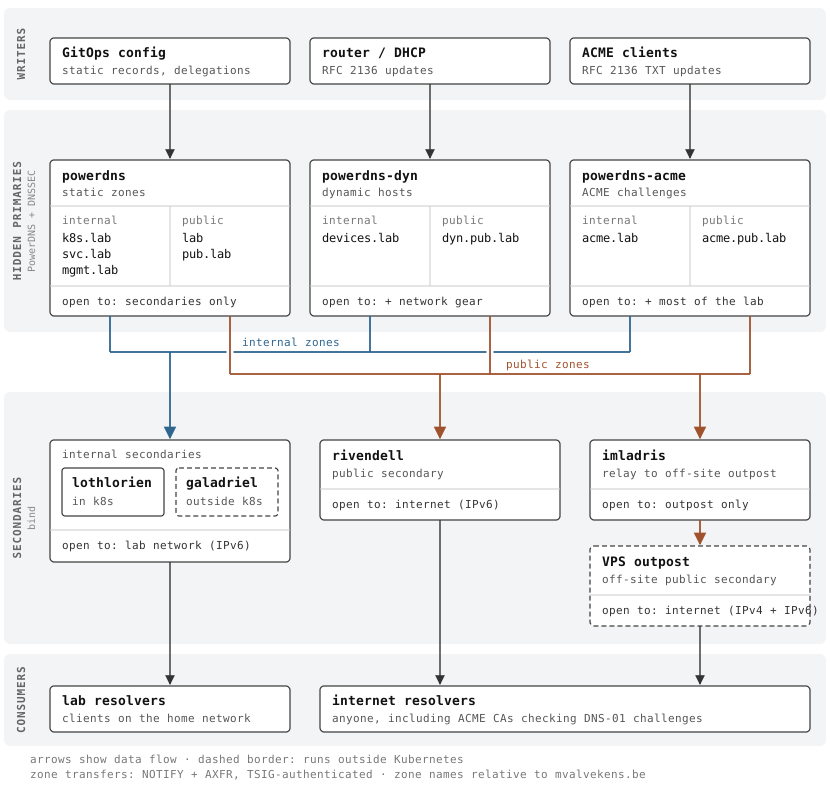
I’m fairly happy with where I am on the DNS front now, but there’s always more on the horizon.
On the IPv6 adoption spectrum, I’d place my network somewhere in the “IPv6-mostly” category, but I’m always looking for ways to reduce the IPv4 footprint even further. One of the things I’ve been experimenting with is auto-registration of NAT64 addresses in DNS for IPv4-only hosts—mainly IoT devices. My reason for doing this on the authoritative side as opposed to at resolution time (i.e. DNS64) is that it makes it easier to separate “NAT64 for egress to the IPv4 internet” from “NAT64 to access IPv4-only local devices”, so the firewall settings are more idiot-proof.
I’m curious about the feasibility of combining GitOps-based DNS management with pre-signed zones. Then I could potentially ditch the
powerdnsinstance for static zones and have my public-facing servers act as primaries directly. Fodder for a future experiment.
Technically, there are of course other ways to keep the data in sync. I’m going to assume the exchange of data happens via a standard zone transfer going forward. Other replication strategies (e.g. PowerDNS’s native replication) may have slightly different properties leading to different resilience trade-offs.↩︎
This is not as limiting as it sounds, since
CNAMEworks across DNS zones. For example, I could havefoo.mvalvekens.bepointing to a device with a dynamic address byCNAME-ing it to a name in my internal zone.↩︎For the
bindsecondaries, this is not quite the full truth. I also operate an additional secondary for the IPv4 internet, and I leave one secondary for internal zones running on a host outside my k8s cluster as a contingency, in case I accidentally blow up the cluster.↩︎I used to run
external-dns-operatorin RFC 2136 mode, which works just fine, but since I was assigning LB addresses manually anyway for firewall rule management reasons, I consolidated.↩︎“OK, but what if my internal DNS zone isn’t public? I don’t want to leak information about my network to the outside!” If you care about this kind of privacy, you should probably just roll your own PKI. While it’s technically possible to do DNS-01 against a public CA without revealing most of your zone data, it’s kind of a moot point: all certificates issued by public CAs are part of a transparency log. So unless you use wildcard certs for everything (which comes with its own drawbacks), you’re already putting a bunch of information out there no matter what, ACME or no ACME.↩︎
This is true for the vast majority of them, barring some providers with very mature IAM systems such as AWS Route53.↩︎
Some implementations will insist on the CNAME target being prefixed with
_acme-challengeas well.↩︎“KSK” stands for “key-signing key”, the key that is used to sign the ZSKs (“zone-signing keys”) for the zone. The ZSKs are used to sign the actual records.↩︎
For those wondering about the naming scheme: there used to be another server named
elrondon my network playing the same role asgaladriel, but for public zones. I took it down afterrivendellandimladriswent live. I figured the risk of bricking both my k8s cluster and my connection to the outpost server at the same time was low enough that keeping another DNS server around wasn’t worth the effort.↩︎